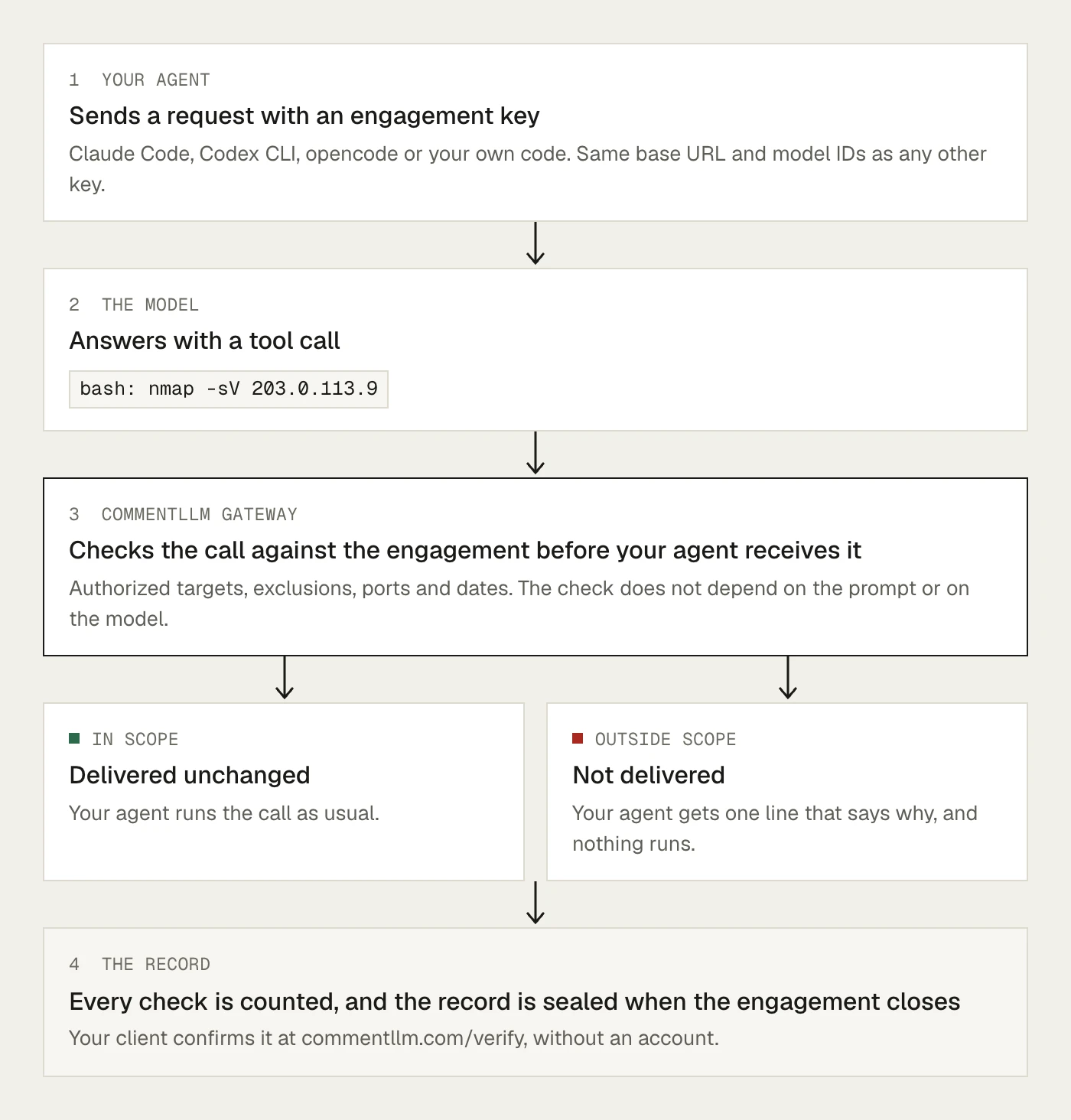
An engagement key is an API key bound to one penetration test: the client, the written authorization, the dates and the targets. While the engagement is open, CommentLLM checks every tool call the model asks for against that scope before your agent receives it. When it closes, you get a sealed record that your client can verify.
Engagement keys are live as of November 2026 and included with every account.
The short version:
- The scope is enforced outside the model. It lives in the API gateway, so a long session, a careless prompt or text planted in a page the agent reads cannot argue with it.
- A call the check finds outside scope is not delivered. Your agent gets one plain line that says why, and the session carries on.
- You end with evidence. Closing the engagement seals a record of what was checked and what was blocked. Anyone can confirm it at commentllm.com/verify, without an account.
Why agentic pentesting needs guardrails outside the model
Agentic pentesting means letting a model choose and run the commands. It plans, calls a shell or a scanner, reads the output and decides what to do next. Abliterated models suit this work because they refuse far fewer requests.
That is also the risk. The scope of a penetration test is a contract, and a host outside it belongs to someone who has not agreed to be tested. An agent can end up there in ordinary ways:
- It mistypes an address, or invents a host name that looks plausible.
- It follows a redirect or a DNS record to a third party's server.
- It reads a page that contains instructions, and follows them.
The usual places to put the rule each have a weakness:
| Where the rule lives | What goes wrong |
|---|---|
| In the system prompt | It is a request, not a control. A model can drift from it over a long session, and anything the agent reads can contradict it. |
| In the model's own refusals | A model that refuses security work is the wrong model for the job, and it does not know your scope. |
| In each agent's permission prompts | Useful, but someone has to read every command, and every agent and machine is set up separately. |
A guardrail for an autonomous agent has to be deterministic, and it has to sit where the model cannot reach it. Every tool call passes through one such place: the API between your agent and the model. Engagement keys put the rules of engagement there.
How an engagement key works
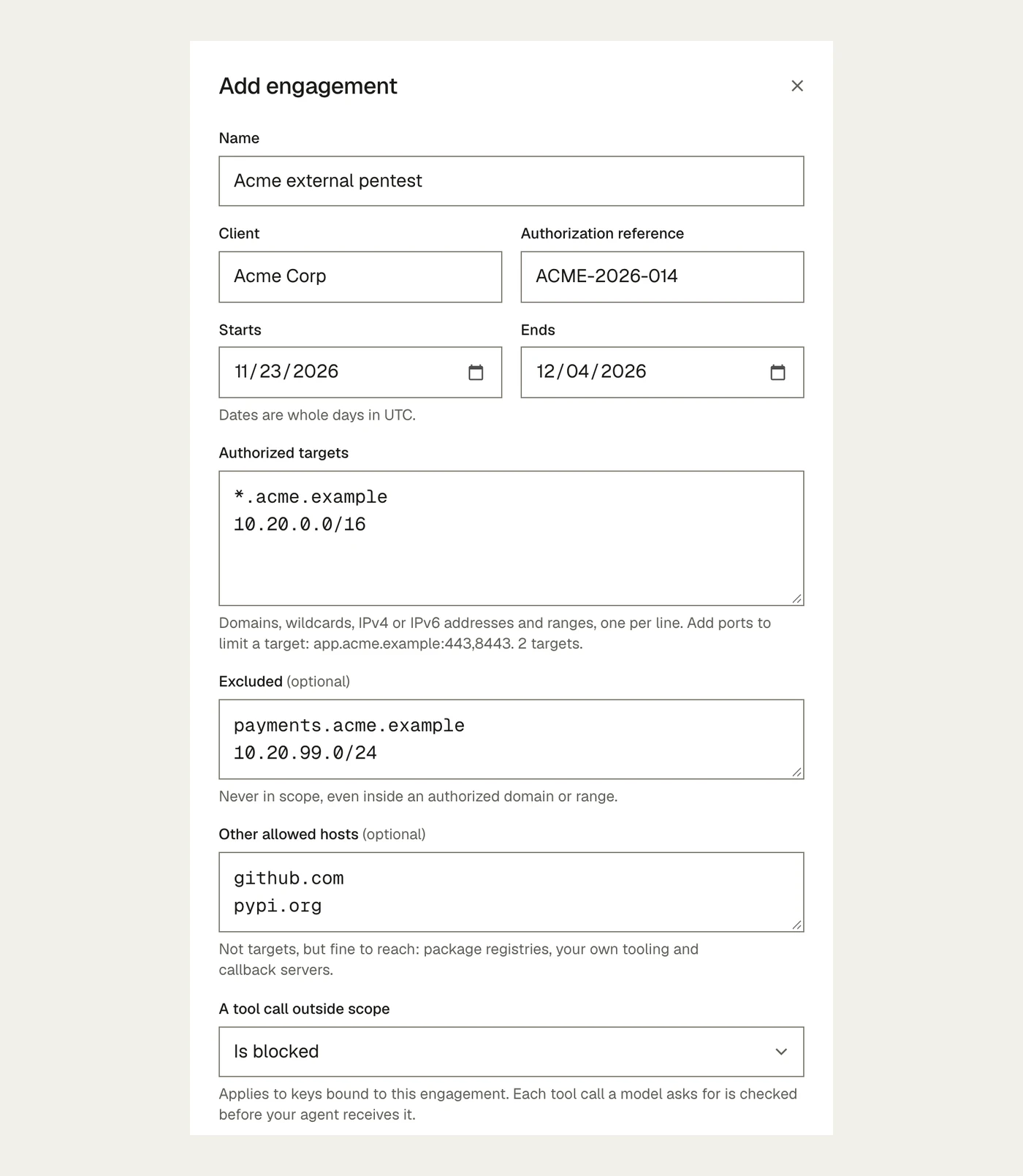
1. Describe the engagement. In the console you enter what your rules of engagement already say: the client, the authorization reference, the dates, the targets, what is excluded, and the other hosts the agent may reach.
2. Create a key for it. The key works only while the engagement is active and inside its dates. Before the start date, after the end date, or once you close the engagement, requests get a 403 that says why. In the OpenAI formats its code is engagement_not_active.
3. Point your agent at it. The base URL and the model IDs stay the same, and there is nothing to install. The key works with the OpenAI Chat Completions and Responses formats and with the Anthropic Messages format.
From then on, the gateway reads each tool call in the model's answer and looks for the addresses, URLs and host names in it.
| In the engagement | Example | What it does |
|---|---|---|
| Authorized targets | *.acme.example, 10.20.0.0/16 |
A call that names only these is delivered. Domains, wildcards, IPv4 and IPv6 addresses and CIDR ranges all work. |
| Ports | api.acme.example:443 |
Limits a target to those ports when a call names the port with the host, as a URL or host:port does. |
| Excluded | payments.acme.example, 10.20.99.0/24 |
Never in scope, even inside an authorized domain or range. |
| Other allowed hosts | github.com, pypi.org |
Not targets, but fine to reach: package registries, your own tooling and callback servers. |
| Dates | 23 November to 4 December 2026 | Whole days in UTC. Outside them the key stops working. |
| A call outside scope | Blocked, or recorded | An engagement can record a failing call as flagged and still deliver it, if you want to watch before you enforce. |
The check also reads an address written in a less obvious form. A URL such as http://3405803785/ is 203.0.113.9 written as one number. It is read as that address and refused like any other outside scope.
What your agent sees
When a streamed answer contains a call outside scope, the call is replaced by one line and the answer ends normally:
[CommentLLM] Tool call not delivered. 203.0.113.9 is not in scope for the engagement "Acme external pentest".
An excluded target says so:
[CommentLLM] Tool call not delivered. payments.acme.example is excluded from the engagement "Acme external pentest".
A request without streaming gets a 403 with the same reason in a form your code can read. In the OpenAI formats:
{
  "error": {
    "message": "Response blocked by policy \"Engagement scope\". 203.0.113.9 is not in scope for the engagement \"Acme external pentest\".",
    "type": "invalid_request_error",
    "code": "policy_violation",
    "policy": "Engagement scope",
    "reason": "203.0.113.9 is not in scope for the engagement \"Acme external pentest\".",
    "stage": "response",
    "engagement_id": "ebdf524e-ff9d-4691-8f8b-810603129bf5",
    "engagement": "Acme external pentest"
  }
}
The Anthropic Messages format returns the same message as a permission_error.
Why a line of text and not an error? We tried the error first. Coding agents treat an error in the middle of a stream as a network failure. In our tests, Codex CLI retried the request five times and never showed the reason, and Claude Code sent the request again without streaming. With an ordinary ending, each agent shows the reason after one request and does not run the command.
| Agent | Version tested | When the model asks for a call outside scope |
|---|---|---|
| Claude Code | 2.1.332 | Shows the reason after one request. The command is not run. |
| Codex CLI | 0.172.0 | Shows the reason after one request. The command is not run. |
| opencode | 1.19.6 | Shows the reason after one request. The command is not run. |
We ran all three against the live API on 26 November 2026. A refused request is logged as blocked and billed for its input only. Each agent has a setup guide: Claude Code, Codex CLI and opencode.
One difference to know about: if your organization also runs its own policies on responses, the whole answer is checked before any of it is sent, and the line starts with "[CommentLLM] Answer not delivered." instead. The reason is left out of either line when one of your own request policies would block it in the next request.
The record your client can check
When the work is done, you close the engagement. Its keys stop working, and CommentLLM seals the record: it stores the SHA-256 digest of the record as it stands at that moment. This is the record of a sample engagement after closing:
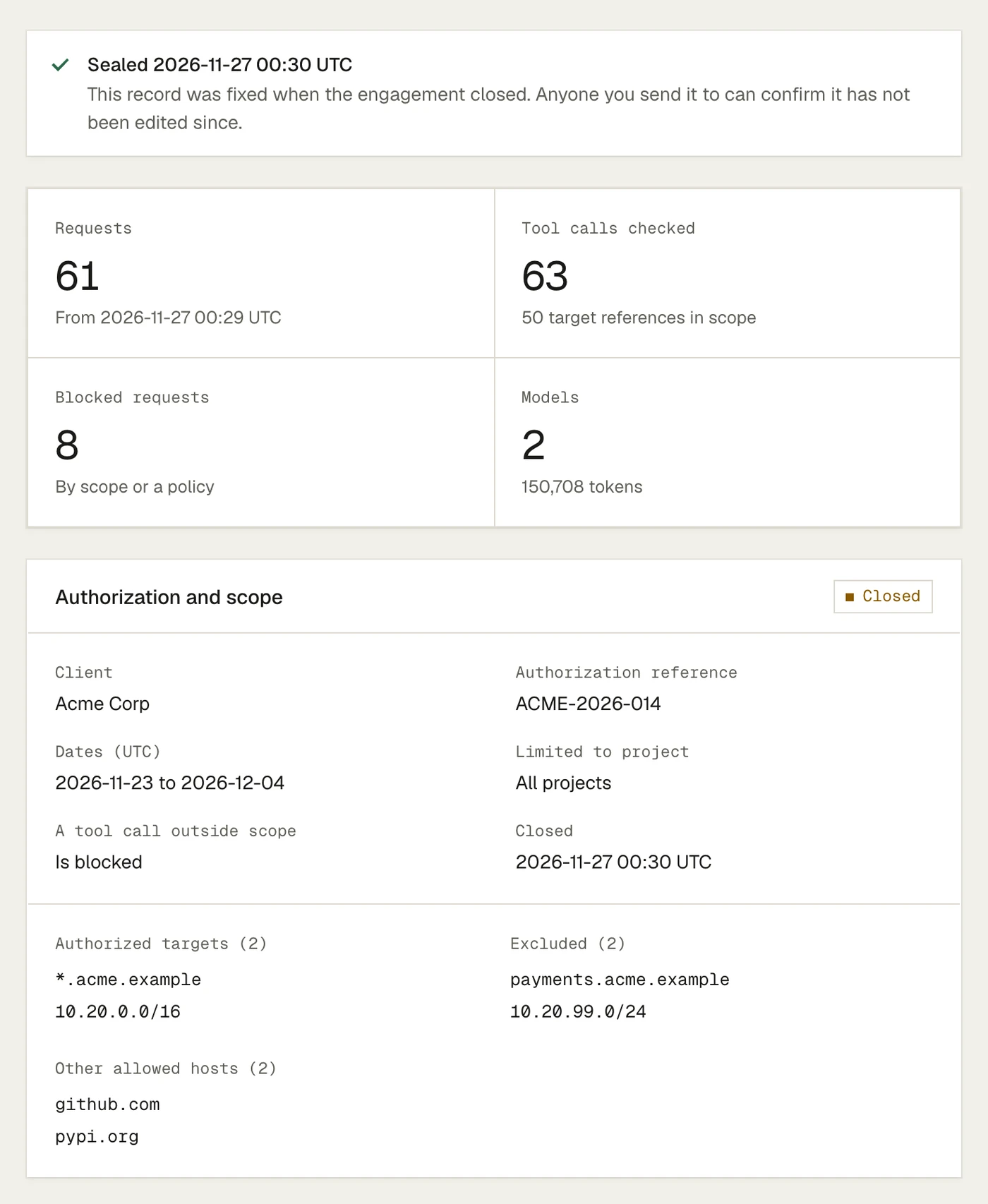
The record holds:
- The authorization: client, reference, dates, targets, exclusions and other allowed hosts.
- The keys bound to the engagement, and who created them.
- Requests for each day, and requests and tokens for each model.
- For each check, how many tool calls it read and how many answers it allowed, flagged and blocked.
- Every blocked or flagged decision, up to the first 10,000, with its time and request ID, chained by hash so that a removed or edited one shows.
- A timeline of who created, edited and closed the engagement.
It does not hold your prompts, the model's responses, the tool calls or the addresses a call named. A blocked call is recorded as a count. The scope you entered is part of the record.
You download the record as a JSON file and send it to your client. They drop it on commentllm.com/verify. The page reads the file in the browser, recomputes the hashes and asks CommentLLM one question: is there a seal for this digest? Only the engagement's ID and the digest leave the browser.
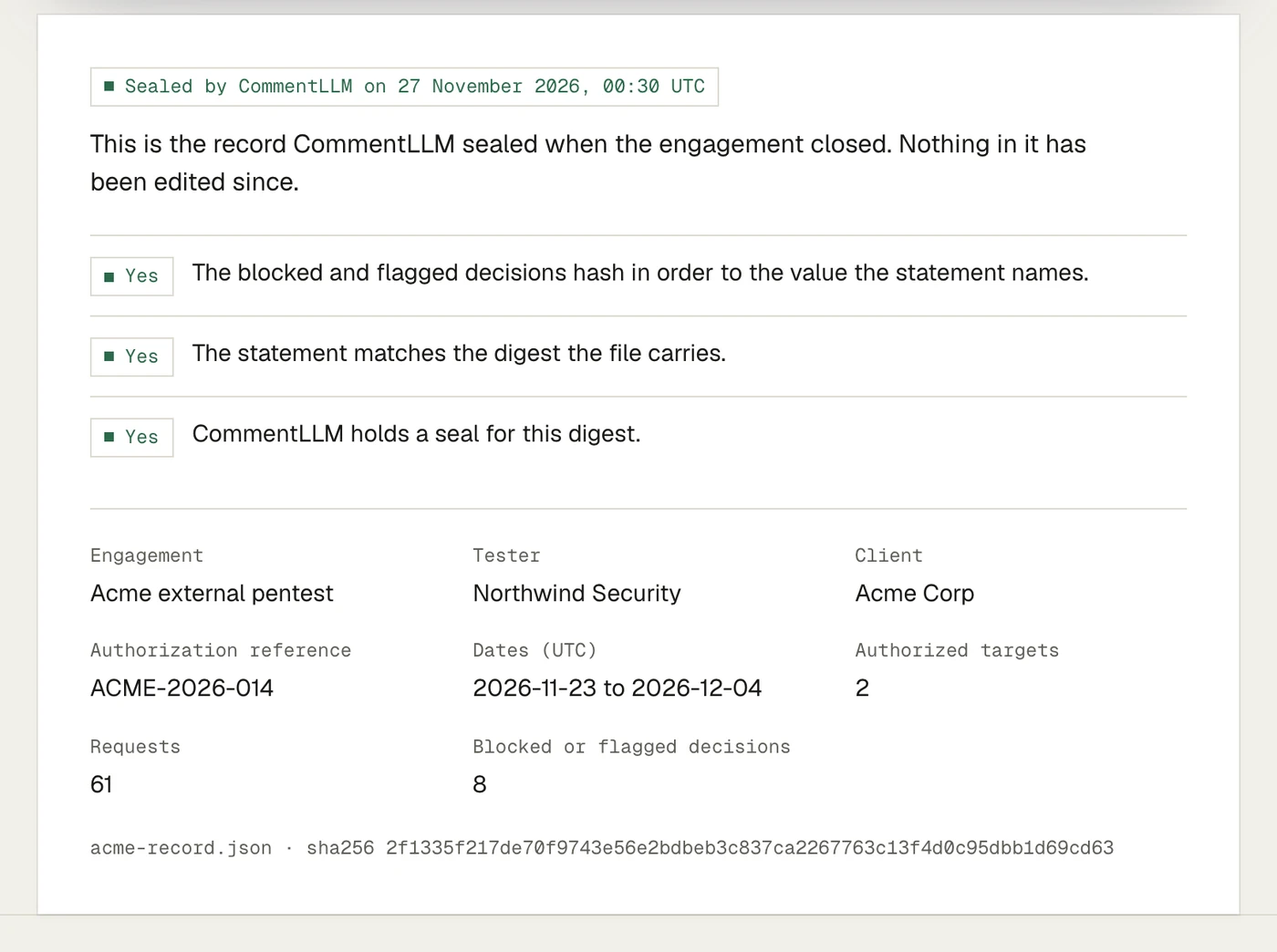
The answers a client is most likely to see:
- Sealed. This is the record CommentLLM sealed when the engagement closed, and nothing in it has been edited since.
- This file has been changed. The file no longer matches its own hashes.
- Not sealed. The record was exported while the engagement was still open.
What we checked in production
The screenshots above show a sample engagement. This is what we ran against the live API on 26 November 2026, with real models:
| What we did | Result |
|---|---|
| Made requests with an engagement key in all three API formats, with and without streaming, on two models, by script and from three coding agents | 24 requests, 19 tool calls checked |
| Tool calls that named an address in scope | 8, all delivered |
| Tool calls that named an address outside scope, or an excluded one | 11, none delivered |
| Ran Claude Code, Codex CLI and opencode in a sandbox with the key | Each showed the reason after one request and did not run the command |
| Closed the engagement and used the key again | 403 engagement_not_active |
| Checked the sealed record at /verify | Sealed |
| Changed one blocked decision to allowed in a copy of the record | Reported as changed |
What it does not do
You should know the limits of a guardrail before you rely on it. These are the limits of this one:
- It reads tool calls, not outcomes. The check sees the call the model asked for. It does not see what a tool did once it ran.
- It reads an address only when it is unambiguous. IP addresses, URLs, names under a domain you listed, and bare host names with a common ending such as
.comor.ioare read. A bare name with a rarer ending, such asdb01.corp.internal, is read only in a URL, with a port, or under a domain you listed. A script the agent wrote earlier and now runs by its file name is not read at all. So list your client's domains, including the ones to stay away from. - A port limit needs the port next to the host. It applies to a URL or to
host:port. A port given as a separate flag, as innmap -p 22 api.acme.example, is checked by host alone. - Record-only mode blocks nothing. A failing call is flagged and still delivered.
- It covers this engagement's keys only. Work done with another key, another model or by hand is not in the record.
- A seal shows the record is unchanged. It does not show that the record is complete.
- It is not your authorization. The engagement records the reference to it. You still need the signed rules of engagement.
Use it together with your agent's own permission prompts and a sandbox, not instead of them.
Set it up
- Create an account and add credit. Engagement keys are included with every account, with or without a plan, and you pay for the tokens your requests use. See pricing.
- In the console, open Policies, then Scope, and add an engagement.
- On the engagement's page, create a key and give it to your agent.
The Scope section of the docs has the details and the error codes. To send each blocked or flagged decision to your own logging as it happens, see SIEM export.
Questions
What is an engagement key?
An engagement key is a CommentLLM API key bound to one penetration test or red-team engagement. It works only while that engagement is active and within its dates. Every tool call a model asks for with it is checked against the engagement's authorized targets, exclusions and ports before the caller receives it.
What guardrails does agentic pentesting need?
An AI pentest agent needs its scope enforced outside the model: a list of authorized targets and exclusions, a testing window, a way to stop it, and a record of what was checked. Instructions in a prompt are not enough, because a model can drift from them. CommentLLM engagement keys enforce targets, exclusions, ports and dates at the API gateway, stop working when the engagement is closed, and seal a record at that point.
Which LLM API can an AI agent use for authorized penetration testing?
CommentLLM serves abliterated DeepSeek and GLM models, which refuse far fewer requests than standard models, through OpenAI- and Anthropic-compatible endpoints. With an engagement key, the same API also holds the agent to the scope of the test and gives the tester a sealed record for the client.
Does it work with Claude Code, Codex CLI and opencode?
Yes. On 26 November 2026 we ran Claude Code 2.1.332, Codex CLI 0.172.0 and opencode 1.19.6 against the live API with an engagement key. When the model asked for a command outside scope, each agent showed the reason after one request and did not run the command.
What happens when a tool call is outside the scope?
A call the check finds outside the scope is not delivered, unless the engagement is set to record only. On a streaming request the answer is a line that starts with "[CommentLLM] Tool call not delivered." and gives the reason, and the stream ends normally. Without streaming, the request gets a 403 with the reason. The request is logged as blocked and billed for its input only.
How does a client verify the record?
The tester closes the engagement, downloads the record as a JSON file and sends it to the client. The client drops the file on commentllm.com/verify, which needs no account. The page recomputes the record's hashes in the browser, checks the digest against the seal CommentLLM stored, and says whether the record is the sealed one, has been changed, was exported before sealing, or was replaced by a later one.
Does CommentLLM store my prompts or my tool calls?
No. CommentLLM does not store the prompts, responses or tool calls of these requests. It stores the scope you entered for the engagement and metadata about each request: times, models, token counts, statuses and policy outcomes. A blocked tool call is recorded as a count, and the addresses it named are not kept. Requests are sent to an external inference provider to generate responses, as the trust page explains.
Do engagement keys cost extra?
No. Engagement keys, their scope checks and the engagement record are included with every account, with or without a plan. You pay for the tokens your requests use.
Do I still need written authorization?
Yes. An engagement key records the reference to your authorization and holds the agent to the scope you entered. It does not replace the signed rules of engagement, and CommentLLM's acceptable use policy allows only work you are authorized to do.